
Check out our data plans here!
The Peplink 5G Adapter adds a carrier-certified 5G WAN to the router or firewall a site already runs. It serves two roles. As automatic backup for an existing wired ISP, it lets the firewall’s own multi-WAN failover do the switching. As a standalone primary connection, it carries pop-up sites and new locations awaiting wired service. For MSPs, that means one cellular device and one SIM strategy across mixed-vendor clients.
Contents
- What Is the Peplink 5G Adapter?
- Peplink 5G Adapter Specs, Price and Carrier Certifications
- Why Add a 5G Failover Modem Instead of a New Router
- How to Set Up 5G Failover Behind Any Firewall
- Choosing a SIM Data Plan: Backup vs. Primary
- 5G Adapter vs. UniFi 5G Backup, UniFi 5G Max and Cradlepoint W2255
- Frequently Asked Questions
- Bottom Line: Is the Peplink 5G Adapter Right for Your Sites?
What Is the Peplink 5G Adapter?
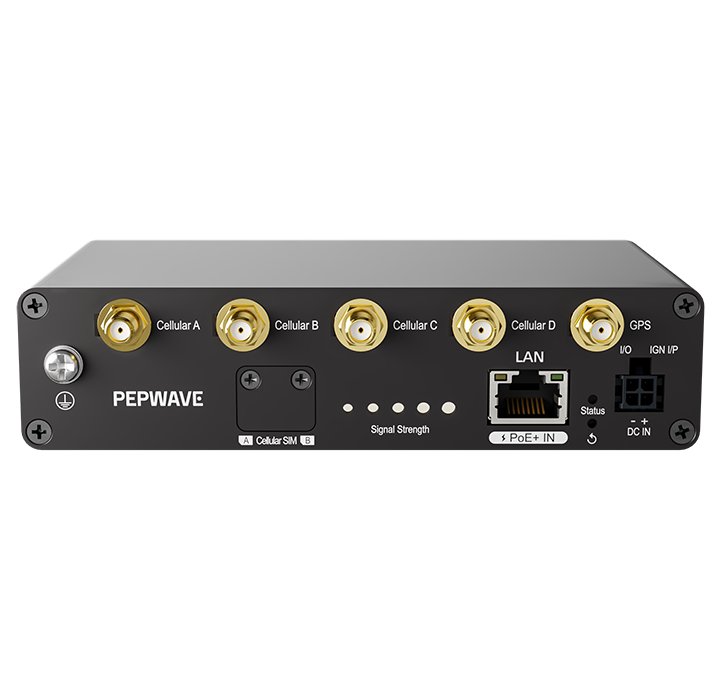
The Peplink 5G Adapter (ADP-5GY-T-PRM) is a single-modem 5G cellular adapter for any router, firewall or switch. It connects through one 2.5 GbE Ethernet port and runs on PoE+ or DC power. It holds two Nano-SIMs and, with IP Passthrough enabled, hands the cellular WAN IP straight to your firewall for failover or primary use.
Peplink released it on April 9, 2026. U.S. resellers sell it as the Pepwave 5G Adapter, the brand printed on the unit, for about $399 (September 2026). Unlike the USB-C Pepwave 5G Dongle, it connects over Ethernet. Neither device has Wi-Fi.
Peplink 5G Adapter Specs, Price and Carrier Certifications
Figures come from Peplink’s North American datasheet and FAQ; Peplink’s official 5G Adapter product page has ordering details.
| Specification | Peplink 5G Adapter (ADP-5GY-T-PRM) |
|---|---|
| U.S. price | About $399 at U.S. resellers (September 2026); Peplink’s product page lists no price |
| Cellular modem | Single 5G modem, 5G NR Sub-6 (NSA and SA) with LTE Cat 19 fallback |
| Theoretical maximum speed | 5G: 3.4 Gbps down / 550 Mbps up; LTE Cat 19: 1.6 Gbps down / 200 Mbps up (modem rates; the 2.5 GbE port caps delivered throughput) |
| 5G bands | n2, n5, n7, n12, n13, n14, n25, n26, n29, n30, n38, n41, n48, n66, n70, n71, n77, n78 |
| LTE bands | B2, B4, B5, B7, B12, B13, B14, B17, B25, B26, B29, B30, B38, B41, B42, B43, B46, B48, B66, B71 |
| SIM | Dual Nano-SIM (4FF) slots, one active at a time |
| Ethernet | 1x 10/100/1000/2500 Mbps RJ45 with 802.3at PoE+ input |
| Antenna connectors | 4x SMA cellular, 1x SMA GPS |
| Power | PoE+ (802.3at), included 12V 2A Micro-Fit supply, or 10–30 VDC; 6.5W nominal |
| Other hardware | GPS, GPIO, ignition sensing, 0–5 bar LED signal meter |
| Environment | Rugged metal enclosure; -40 to 65 °C (-40 to 149 °F); no published IP rating |
| Size and weight | 5.4 x 3.1 x 1.3 in; 0.86 lb |
| In the box | Adapter, 12V 2A power supply, four LTE/5G antennas, GPS antenna (no PoE injector) |
| Management | Web admin plus InControl 2; 1-year PrimeCare included, renewable as PrimeCare Plan Z |
| Certifications | FCC, CE, RoHS; U.S. carriers: Verizon, AT&T, T-Mobile, FirstNet |
Certification Details by Carrier
- Verizon: Certified through Verizon Open Development on June 19, 2026, with n77 C-Band support.
- AT&T: Listed on Peplink’s datasheet and certification page, along with FirstNet.
- T-Mobile: Rated 3 out of 3 on T-Mobile’s IoT device certification page, with n41 and n77 mid-band 5G support.
Why Add a 5G Failover Modem Instead of a New Router
Most sites already run a trusted firewall carrying their policies, VLANs and VPNs. Replacing it to get 5G therefore means rebuilding all of that. Instead, the Peplink 5G Adapter shows up as one more Ethernet WAN.
- Automatic backup for the wired ISP: Plug it into a spare WAN port. The firewall’s multi-WAN rules and health checks shift traffic to 5G when the wired line drops, then back on recovery.
- Primary connection for new sites: At a construction trailer, pop-up or new location, the adapter carries the site until wired service arrives, then becomes the backup.
How to Set Up 5G Failover Behind Any Firewall
The Peplink 5G Adapter ships in NAT mode, with a DHCP server and web admin at https://192.168.50.1. A firewall plugged in as-is therefore sits behind double NAT, which complicates inbound VPNs, port forwarding and some VoIP systems. However, a short bench routine removes the adapter’s NAT layer and makes every unit identical. Inbound access still needs a public static IP option, covered below.
Step 1: Pre-Stage Every Unit on the Bench
- Update firmware first: Launch-era units may lack the IP Passthrough setting; update via System > Firmware or InControl 2.
- Secure the login: Default credentials are admin/admin; the first login forces a new password.
- Avoid subnet clashes: If the client network already uses 192.168.50.0/24, change the adapter’s LAN address.
- Insert SIMs and set priority: Load the ISPTek SIMs and drag SIM A and SIM B into priority order. The APN defaults to Auto; enter ISPTek’s APN if needed.
- Enable IP Passthrough: In the current firmware UI, it sits under Network > WAN > cellular connection > WAN Connection tab. Save, and power cycle if the firewall doesn’t pick up the new address.
- Enroll in InControl 2: Add each unit before it ships; firmware 2.1.0 reports WAN data usage for tracking plan allowances.
Step 2: Mount for Signal and Choose a Power Source
One PoE+ run of up to 100 meters carries power and data, so the adapter can sit where signal is best.
- Read the signal: Check the LED bars, then Status > WAN Quality for recent signal, throughput and latency.
- Lock if needed: SIM settings can restrict the adapter to one carrier or specific 5G and LTE bands.
- Pick a power source: Use the included 12V supply, 10–30 VDC or PoE+ (802.3at).
- Keep the WAN path direct: Cable straight to the firewall’s WAN port, or through a 2.5G-rated PoE+ injector or multi-gig PoE+ switch port on a dedicated cellular WAN VLAN. Gigabit-only PoE gear or a 1 GbE firewall port caps the link at 1 Gbps. Keep the firewall the only DHCP client there; IP Passthrough hands the cellular IP to the first one it sees.
- Mounting hardware: DIN rail and ear mount kits are sold separately.
Step 3: Configure Failover on the Firewall
- Set the WAN to DHCP: Configure the firewall’s spare WAN interface for DHCP so it receives the passed-through cellular IP.
- Backup role: Give the cellular WAN lower priority than the wired ISP, then turn on WAN health monitoring. Point the checks at reliable external targets where the platform allows it; Meraki MX runs its own built-in uplink tests.
- Primary role: Where wired service isn’t installed yet, make the adapter the primary WAN, then drop it to secondary once the circuit is live.
- Test before handover: Pull the wired WAN cable and confirm traffic moves to 5G and back.
Choosing a SIM Data Plan: Backup vs. Primary
The Peplink 5G Adapter makes the connection possible, but the SIM plan decides how it behaves during an outage. ISPTek’s cellular SIM card data plans offer 12+ options on Verizon (Red), AT&T (Blue) and T-Mobile (Pink). Billing is month-to-month with no activation or cancellation fees. Every order also includes a tri-cut SIM that fits the Nano-SIM slots. Match the plan to the site’s role:
| Site role | ISPTek plan family | Why it fits the 5G Adapter |
|---|---|---|
| Backup at many sites, light usage | Red Base (1, 2, 5 or 10 GB) | Pools data across SIMs in the same plan category (multiple SIMs required); per-GB overage after the pool |
| Backup with more headroom | Red Signature (20, 30 or 50 GB) | Pooled data (same plan category) with lower per-GB overage than Red Base; the SIM is limited to 4G, so the adapter runs on LTE only |
| Backup with more headroom on 5G | Pink 100 GB or 300 GB | QCI7 allowance data on 4G and 5G; 600 Kbps after the allowance |
| Backup that must hold priority | Pink 10 GB or 25 GB | Highest Priority (QCI6) data on a small allowance |
| Heavy failover or primary at a set speed | Red (25 or 50 Mbps) or Blue (25, 50 or 100 Mbps) network-managed tiers | Set speed with a 300 GB monthly allowance split between premium and managed data |
| Primary connection, unlimited data | Red Business Internet (100 or 200 Mbps), Blue Unlimited Prime or Basic, Pink Unlimited | Meets the Red Business Internet (C-Band) and Pink Unlimited (mid-band) device requirements; Blue Unlimited Prime includes 250 GB/mo of QCI7 premium data, Pink Unlimited runs QCI8 for the first 1.2 TB, and Blue Unlimited Basic is best effort |
Public Static IP for Remote Access and VPN
Standard cellular SIMs usually sit behind carrier-grade NAT, so even with IP Passthrough the firewall may be unreachable from outside. Adding ISPTek’s public static IP option to the SIM gives the cellular WAN a fixed, reachable address. Site-to-site VPNs, remote management and NVR access can then be configured to use it. A SIM on a second carrier needs its own static IP option, so list both addresses in VPN peer and allowlist settings. Our guide explains why a cellular backup SIM needs a static IP.
Pooled Data Across the Portfolio
Backup SIMs sit mostly idle, then spike during an outage. Red Base and Red Signature plans each pool data with other SIMs in the same plan category (multiple SIMs required). One site’s outage then draws on allowance the quiet sites never used. See how cellular data pooling works for MSPs.
Two Carriers, One Adapter
Put the lead carrier’s SIM in slot A and a second carrier’s SIM in slot B, then set priority. You also choose whether the adapter fails back to the preferred SIM when idle or after a set time. Only one SIM is active at a time, so this is carrier redundancy, not bonding.
Each SIM needs its own plan, so size both to the site’s role. For backup, pair two small allowances, such as Pink 10 GB and Red Base. For primary, lead with a Blue or Pink unlimited plan and keep a Red Base SIM on standby. Our Verizon vs. AT&T vs. T-Mobile comparison for business backup helps pick the lead network. Peplink doesn’t list UScellular (ISPTek Green) for this adapter, so stay with Red, Blue or Pink.
5G Adapter vs. UniFi 5G Backup, UniFi 5G Max and Cradlepoint W2255
| Feature | Peplink 5G Adapter | UniFi 5G Backup (U5G) | UniFi 5G Max | Cradlepoint W2255 |
|---|---|---|---|---|
| Cellular | 5G Sub-6 SA/NSA, LTE Cat 19 | 5G RedCap (SA only), LTE | 5G Sub-6, LTE | 5G SA/NSA, LTE Cat 20 |
| Theoretical peak (down/up) | 3.4 Gbps / 550 Mbps | 220 / 120 Mbps | 3.4 Gbps / 560 Mbps | 4.9 Gbps / 900 Mbps |
| SIM slots | 2x Nano-SIM | 1x Nano-SIM | 2x Nano-SIM | 2x Nano-SIM |
| Ethernet and power | 1x 2.5 GbE, 802.3at PoE+ or DC | 1x GbE, 802.3af PoE | 1x 2.5 GbE, PoE | 2x 2.5 GbE, 802.3af PoE or 12 VDC |
| Third-party firewalls | Yes; IP Passthrough supported | UniFi gateway only; no third-party support documented | UniFi gateway only; no third-party support documented | Yes; IP Passthrough mode |
| Enclosure | Metal, -40 to 65 °C, no IP rating | Indoor, 0–40 °C | Indoor, 0–40 °C | IP67, indoor or outdoor |
| U.S. price | About $399 (resellers) | $99 | $399 list ($430 with Ubiquiti’s current surcharge) | Sold only in NetCloud packages |
For an all-UniFi client, the $99 Ubiquiti UniFi 5G Backup is the budget pick, and the UniFi 5G Max adds full Sub-6 5G speeds. However, both adopt into the UniFi Network application, and Ubiquiti documents no third-party router support. Cradlepoint’s W2255 is the IP67 option, but its warranty depends on an active NetCloud subscription. The Peplink 5G Adapter sits between them: vendor-neutral, sold outright and managed through InControl 2.
For an all-Peplink site, or one due for a new firewall, a built-in-modem router saves a box. The Peplink MAX BR1 Pro 5G is one example. For a branch office, the Peplink Balance 310 5G pairs its built-in 5G modem with a 10G WAN port and Wi-Fi 7.
Frequently Asked Questions
Does the Peplink 5G Adapter cause double NAT?
Out of the box, yes: it runs NAT with a DHCP server on 192.168.50.x, so the firewall gets a private address. Update the firmware and enable IP Passthrough, and the firewall receives the cellular WAN IP directly.
Does the Peplink 5G Adapter work with FortiGate, SonicWall, Meraki or pfSense?
It should. Peplink’s FAQ says to plug it into “your router or switch,” so any firewall that accepts a DHCP Ethernet WAN can use it. Peplink names no tested third-party models, so run the Step 3 cable-pull test on each model first.
Can the Peplink 5G Adapter be mounted outdoors?
No IP rating is published, so plan on an indoor, sheltered or enclosed location. Where the best signal is outside, keep the adapter indoors and add an outdoor-rated antenna such as Peplink’s Mobility 40G add-on.
Bottom Line: Is the Peplink 5G Adapter Right for Your Sites?
The Peplink 5G Adapter fits wherever the firewall already works and shouldn’t change. It gives the existing firewall an automatic 5G failover path behind the wired ISP. It also serves as a standalone primary link while a site waits on wired service. It is strongest for:
- MSPs with mixed-vendor clients: One failover modem and one bench routine across FortiGate, SonicWall, Meraki and UniFi sites.
- Multi-location retail, restaurants and branches: POS, card processing and branch VPNs stay up when the wired ISP drops. Multiple Red Base or Red Signature SIMs in the same plan category can pool data across locations.
In either role, the adapter is only as useful as its SIM plan. ISPTek supplies that side: 12+ cellular SIM card data plans on Verizon, AT&T and T-Mobile, public static IP options and no activation or cancellation fees. Match a plan to each site’s role, pre-stage the adapter, and each site goes live with cellular as its primary link or the firewall’s automatic backup.
View available data plans and activate your Peplink 5G Adapter today!
