
Check out our data plans here!
Peplink makes some of the most capable multi-WAN routers in the SMB and enterprise space, and cellular is almost always in the picture — whether as a failover WAN, a primary connection at a site without wired ISP options, or an active participant in a SpeedFusion bonded WAN. Getting the right cellular data plan matters more with Peplink than with most other hardware because Peplink’s most powerful features — SpeedFusion bonding, WAN smoothing, hot failover — are fundamentally data-intensive. The wrong plan tier or the wrong billing structure can either leave you over-paying for data you don’t need or throttled at exactly the moment the cellular link matters most. This guide covers the Peplink lineup MSPs deploy most, how to size a data plan for each use case, and why ISPTek’s pooled plans are what multi-site Peplink deployments run on at scale.
Contents
- The Peplink Lineup: Devices MSPs Deploy Most
- Matching the Data Plan to the Use Case
- SpeedFusion Bonding: How It Changes Your Data Sizing
- Why Carrier-Direct Plans Don’t Scale for Multi-Site Peplink Deployments
- ISPTek Plan Recommendations for Peplink Devices
- Frequently Asked Questions
The Peplink Lineup: Devices MSPs Deploy Most
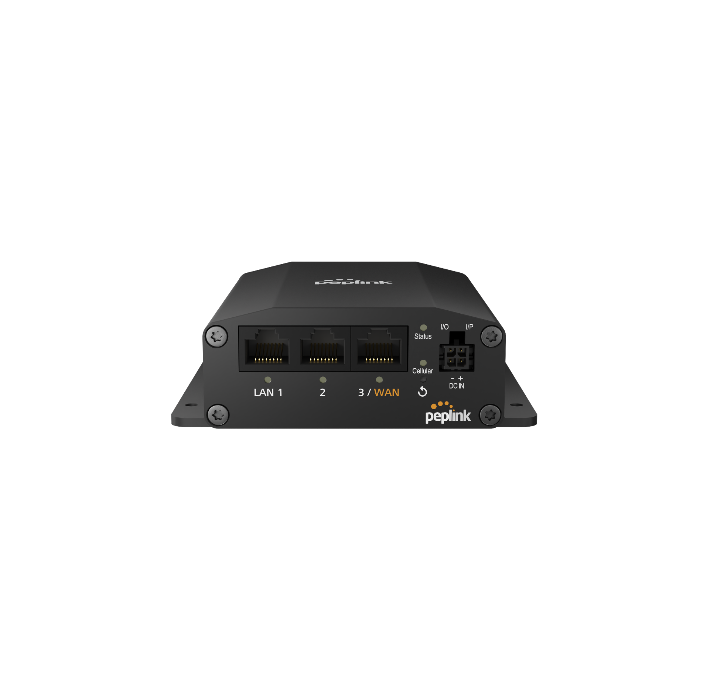
Peplink’s product line spans from affordable single-SIM LTE routers to high-performance multi-WAN bonding platforms. The devices that appear most frequently in MSP client deployments:
| Device | SIM Slots | SpeedFusion | Primary Use Case | Typical Data Plan Need |
|---|---|---|---|---|
| MAX BR1 Mini 5G | 2 (1 active) | Yes (hub connection) | Branch cellular failover or primary WAN | Light backup or mid-tier primary |
| MAX BR1 Pro 5G | 2 (1 active) | Yes | Branch failover, primary WAN, mobile | Light to mid — depends on role |
| MAX BR2 Pro 5G | 4 (2 active) | Yes | Primary WAN bonding, dual-carrier failover | Mid to high — dual SIM active |
| MAX Transit Duo Pro | 4 (2 active) | Yes (full SD-WAN) | Vehicle, mobile broadband, bonded WAN | High — active-active bonding in mobile use |
| Balance 310 5G | 2 (1 active) | Yes | Multi-WAN branch with wired + cellular | Light backup or mid primary |
| B One 5G | 2 (1 active) | Yes | Enterprise branch with dual wired WAN + 5G | Light backup, or mid when 5G is bonded with wired WAN |
Every device in this table supports SpeedFusion — Peplink’s proprietary WAN bonding and SD-WAN technology — and every one accepts third-party nano-SIM cards from ISPTek or any compatible provider. The choice of plan tier depends far more on how the cellular connection is being used than on which specific Peplink model you’ve deployed.
Matching the Data Plan to the Use Case
Peplink deployments fall into three cellular use cases with meaningfully different data consumption profiles. Getting the plan tier right for each is the most important decision in a Peplink cellular deployment.
LTE/5G backup and failover (WAN2 or standby)
In a pure failover deployment, the cellular SIM is idle when the primary wired ISP is healthy. It activates only during outages — which for most business-grade ISP circuits means a few hours to a few days per year. A site with 99% ISP uptime uses its cellular backup for roughly 87 hours per year. A light-use plan with modest allocation, placed in a pooled account with other backup SIMs, is the right fit. The pooled structure means an outlier site with an extended outage draws from the shared allocation rather than triggering overages on its individual plan.
For reference: a 15-person office running standard business applications (email, cloud apps, video calls) consumes approximately 8–15GB per day of active use. A 3-day ISP outage at full office usage would require 24–45GB from the cellular backup. A 5GB per-SIM plan isn’t adequate; a pooled account with headroom across all sites is.
Primary cellular WAN (no wired ISP)
At sites where cellular is the only WAN connection — construction sites, temporary offices, retail kiosks without ISP infrastructure, remote locations — the cellular SIM carries all traffic, all day, every day. Monthly consumption at a 10–15 person office on primary cellular can range from 100–400GB depending on application mix. Video conferencing, cloud backup, and large file transfers are the biggest drivers. Plan sizing needs to reflect sustained daily usage rather than occasional failover events.
SpeedFusion WAN bonding (active-active multi-SIM)
SpeedFusion bonding is the most data-intensive use case. In an active-active configuration, Peplink sends traffic across multiple WAN connections simultaneously — combining bandwidth, eliminating packet loss through FEC (forward error correction), and providing seamless WAN failover. Every SIM in a bonded configuration is passing live traffic continuously, not waiting on standby. Data consumption across a 2-SIM bonded deployment is roughly equivalent to the total traffic the site would consume on a single connection — split across two SIMs. This means your plan sizing decision for a bonded deployment multiplies across the number of active SIMs.
SpeedFusion Bonding: How It Changes Your Data Sizing
SpeedFusion bonding changes the data plan calculus in two important ways that MSPs frequently underestimate on first deployment.
All bonded SIMs are active simultaneously. Unlike a failover configuration where WAN2 sits idle while WAN1 is healthy, SpeedFusion in bonding mode distributes traffic across all bonded links in real time. A deployment bonding a 100Mbps fiber ISP and a 5G cellular link is using the cellular link continuously — it doesn’t just activate when the fiber drops. Plan accordingly: the cellular SIM in a bonded deployment needs a plan sized for active daily traffic, not occasional failover usage.
FEC and WAN smoothing add overhead. Peplink’s SpeedFusion FEC (Forward Error Correction) proactively sends redundant data packets to eliminate packet loss and jitter on the bonded WAN. This is what enables smooth voice and video over a cellular-bonded connection — but it means the actual data transmitted over the cellular link is slightly higher than the raw application traffic. The overhead is typically 10–20% above raw application usage. For high-volume bonded deployments, this overhead is worth factoring into your plan sizing.
Hub connectivity requires a static IP. SpeedFusion operates on a hub-and-spoke model — branch Peplink routers establish encrypted tunnels to a SpeedFusion hub (either a Peplink device at the datacenter or Peplink’s cloud FusionHub service). The hub needs a stable, reachable IP address. If the cellular SIM connecting to the hub doesn’t have a public static IP, tunnel establishment becomes unreliable when the cellular WAN is the primary or only active link. ISPTek static IPs are available on any plan tier and are the standard configuration for SpeedFusion cellular deployments.
Why Carrier-Direct Plans Don’t Scale for Multi-Site Peplink Deployments
MSPs managing Peplink deployments across multiple client sites consistently hit the same friction points when sourcing SIMs directly from carriers.
Per-SIM data caps and failover reality. A backup SIM on a 5GB carrier plan works fine during normal months. During a multi-day ISP outage — when cellular backup carries the full office load — it gets throttled mid-incident. Twenty client sites each on individual 5GB plans have a total allocation of 100GB, but none of them can borrow from each other. Under ISPTek’s pooled model, that same 100GB is available to whichever sites actually need it.
Dual-SIM deployments multiply the billing complexity. The MAX BR2 Pro 5G and similar dual-modem Peplink devices running active-active SpeedFusion need two SIM plans per site. Two carrier accounts, two sets of billing, two support queues when something breaks at 11 PM. ISPTek consolidates both SIMs onto one account regardless of which carrier network each one uses — one invoice, one support contact.
SpeedFusion static IP requirements conflict with standard carrier plans. Carrier SIMs on standard business plans get dynamic IPs. Getting a static IP for SpeedFusion hub connectivity typically requires a business account representative, a special plan tier, and sometimes a provisioning process that takes days. ISPTek static IPs are a standard plan option, not a special request.
ISPTek Plan Recommendations for Peplink Devices
How to match ISPTek’s plan tiers to the most common Peplink deployment scenarios:
| Device | Use Case | Recommended Plan Tier | Key Requirement |
|---|---|---|---|
| MAX BR1 Mini 5G | Failover WAN2 at client sites | Light (5–10GB) — pooled across portfolio | Static IP for SpeedFusion hub or out-of-band management |
| MAX BR1 Pro 5G | Primary cellular WAN at small branch | Mid (50–100GB) — match to office size and app mix | Static IP for remote management and SpeedFusion |
| MAX BR2 Pro 5G (SIM 1) | Primary bonded WAN | Mid to high — active daily traffic | Static IP; size for full office traffic load |
| MAX BR2 Pro 5G (SIM 2) | Secondary bonded WAN or failover | Mid — active in bonding or standby backup | Separate ISPTek SIM, same account, same pool |
| MAX Transit Duo Pro | Vehicle / mobile primary WAN | High — continuous mobile usage | Static IP for fleet management; size for daily connected hours |
| Balance 310 5G | Cellular failover for wired primary | Light — pooled backup across sites | Static IP for out-of-band access during wired outages |
The general sizing rule: if the cellular link is failover-only, pool it with your other backup SIMs and size the pool for your worst-case multi-site outage month. If the cellular link is primary or active in bonding, size it for the office’s actual daily data consumption. For any device where SpeedFusion hub connectivity is in use, a static IP is non-negotiable.
For MSPs deploying Peplink across multiple client sites, ISPTek’s pooled plans are how the data billing stays manageable as the portfolio scales. All SIM cards — across all Peplink device models, across all client sites — are on one ISPTek account, drawing from one shared pool, visible on one invoice. View ISPTek’s full plan catalog and activate your Peplink SIMs today.
Frequently Asked Questions
What SIM card does the Peplink MAX BR1 Mini 5G use?
The MAX BR1 Mini 5G uses a standard nano-SIM (4FF) card. It is carrier-unlocked and certified on Verizon, AT&T, and T-Mobile. Any ISPTek nano-SIM plan on those three networks activates normally in the device.
Does ISPTek work with Peplink’s InControl2 management platform?
Yes. InControl2 is Peplink’s cloud management platform — it manages device configuration, monitoring, and firmware updates. It is independent of the cellular data plan. ISPTek provides the SIM and data plan; InControl2 manages the device. The two operate side-by-side without any conflict.
Can I run ISPTek SIMs in both slots of a dual-SIM Peplink router?
Yes. Running ISPTek SIMs on both modems of a MAX BR2 Pro 5G or similar dual-modem device is a common MSP configuration. Both SIMs can be on the same ISPTek account, pooling data together, even if they’re on different underlying carrier networks — for example, a Verizon-based SIM on the first modem for coverage in one area and an AT&T-based SIM on the second for carrier diversity. One ISPTek account, one pool, one invoice covers both. For LTE deployments, the Peplink MAX BR2 has two CAT-7 modems and four Nano-SIM slots, so two SIMs can be active at once, one per modem, while the other two stand by.
Do Peplink health check pings consume data on ISPTek SIMs?
Yes, but minimally. Peplink’s WAN health check feature sends periodic pings over all WAN connections, including cellular, to verify connectivity and trigger failover. This generates a small amount of background data traffic — typically under 100MB per month per SIM — even when the cellular link is in standby. Under a pooled ISPTek account, this background usage is distributed across the pool and is rarely a meaningful cost factor. It is worth knowing about when evaluating usage on very small per-SIM plans.
What is the best Peplink router for 5G cellular backup at a small business?
For a small business location that already has a wired ISP and needs cellular failover, the MAX BR1 Mini 5G is the most common choice — it adds a single 5G cellular WAN at a competitive price point, supports SpeedFusion for seamless failover, and accepts any ISPTek nano-SIM. For sites that need dual-carrier failover or active-active bonding, the MAX BR2 Pro 5G provides two 5G modems with full SpeedFusion capability. Sites that already run a compatible Peplink router can add 5G backup without replacing it: the Peplink 5G Dongle connects over USB as an additional 5G WAN for failover.
